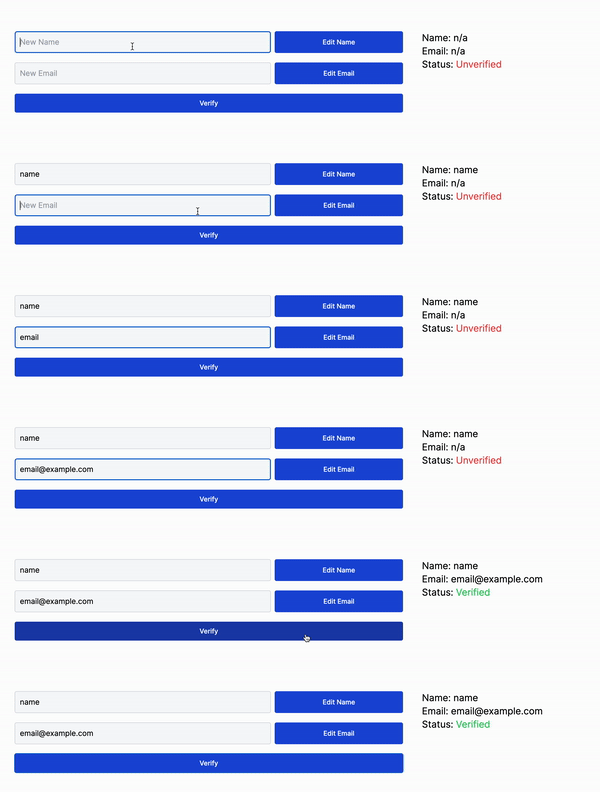
import { AppDispatch } from "@/redux/store";
import { editEmail, editName, verify} from "@/redux/user/userSlice";
import { useRef } from "react";
import { useDispatch } from "react-redux";

export const UserEdit = () => {

    // The useDispatch hook is used to dispatch the redux actions.
    // Note: the AppDispatch is not required for sync actions.
    const dispatch = useDispatch<AppDispatch>();

    // Just a simple two refs to retrieve the values of the inputs.
    const nameInputRef = useRef<HTMLInputElement>(null);
    const emailInputRef = useRef<HTMLInputElement>(null);

    return (
        <div className="w-full flex flex-col gap-5">
            <div className="flex flex-row gap-2 w-full">
                <input ref={nameInputRef} type="text" className="w-2/3 bg-gray-50 border border-gray-300 block  p-2.5 rounded" placeholder="New Name" required />
                <button className="text-white w-1/3  bg-blue-700 hover:bg-blue-800  font-medium text-sm px-5 py-2.5 text-cente rounded"
                    onClick={() => {
                        /*
                          On the click we check if the current ref is not null (type check)
                          then we dispatch the editName action with the new name as its payload.
                        */
                        if (nameInputRef.current?.value == null) return;
                        dispatch(editName(nameInputRef.current.value))
                    }}
                >Edit Name</button>
            </div>
            <div className="flex flex-row gap-2 w-full">
                <input ref={emailInputRef} type="text" className="w-2/3 bg-gray-50 border border-gray-300 block  p-2.5 rounded" placeholder="New Email" required />
                <button className="text-white w-1/3  bg-blue-700 hover:bg-blue-800  font-medium text-sm px-5 py-2.5 text-cente rounded"
                    onClick={() => {
                        if (emailInputRef.current?.value == null) return;
                        dispatch(editEmail(emailInputRef.current.value))
                    }}
                >Edit Email</button>
            </div>
            <button className="text-white w-full  bg-blue-700 hover:bg-blue-800  font-medium text-sm sm:w-auto px-5 py-2.5 text-cente rounded"
                onClick={() => {
                        /*
                          Just like the editName and editEmail we dispatch the verify event
                          only this time without a payload.
                        */
                    dispatch(verify());
                }}
            >Verify</button>
        </div>
    );

}